Working with the feature tree
Edit, rename, suppress, delete, reorder and roll back features — the Feature Tree is the part's editable history.
The Feature Tree (left panel) is not just a list — it is the part. Every row is a step in the recipe, and editing the recipe rebuilds the model.
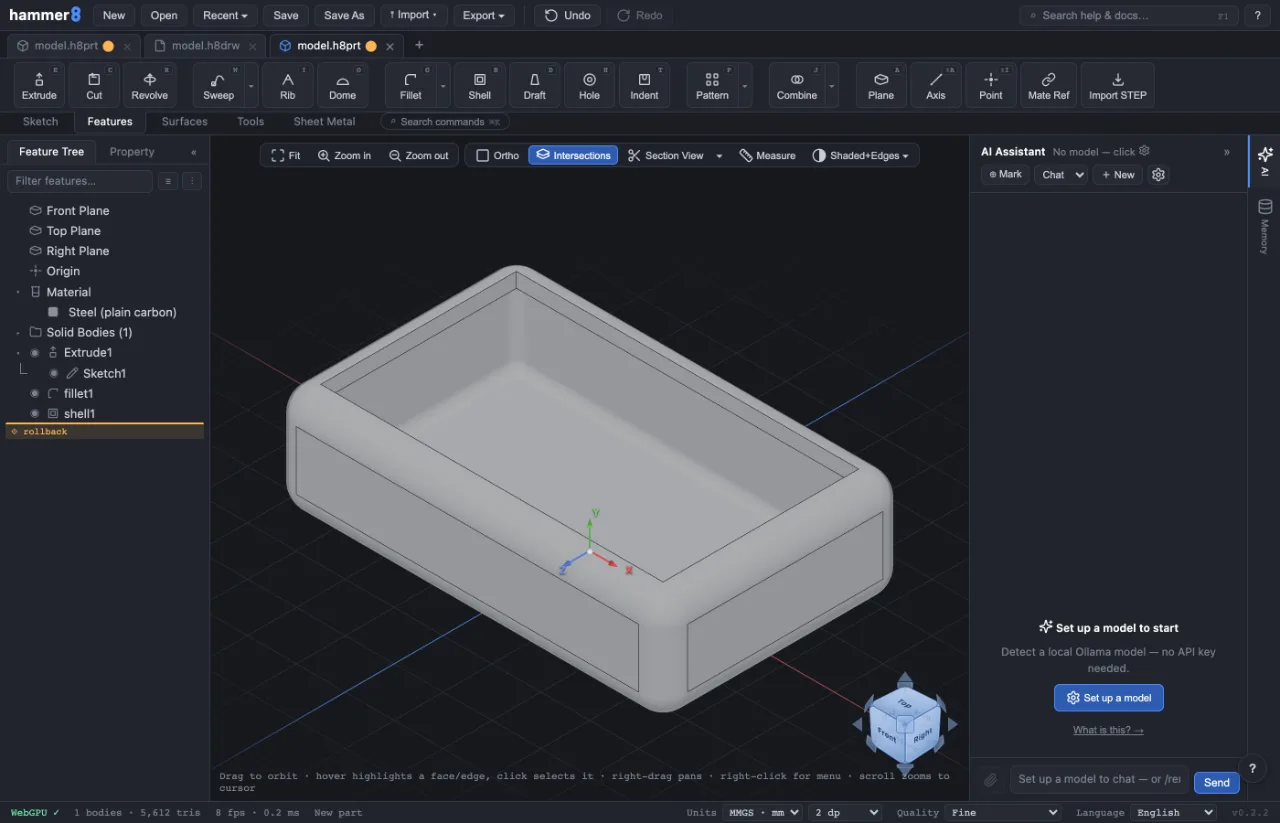
Editing a feature
- Click a row to select it (the geometry highlights in the viewport).
- Double-click to reopen its Property panel — change the value, ✔ OK, and everything downstream rebuilds.
- Editing a sketch re-enters the sketch editor; Finish returns and rebuilds.
The right-click menu
Right-click a row for the quick actions:
- Suppress / Unsuppress — temporarily remove a feature (and its dependents) from the rebuild without deleting it. Great for testing "what if this wasn't here".
- Delete — permanently remove it. If other features depend on it, the app walks you through the cascade first.
- Rename — give features real names ("MountingHoles", not "Cut3"); names travel with the file (Saving, opening & exporting).
Reordering
Drag a row up or down to change the build order — a fillet before or after a shell gives a different part. Illegal moves (a feature above something it depends on) are refused; the dependency graph knows.
The rollback bar
Drag the bar at the bottom of the list upward to replay history only up to that point — the model shows the part as it was mid-recipe. New features insert at the bar. Drag it back down to restore the full part.
When something turns red
A red row failed to rebuild — usually a reference its input lost. Fix a rebuild error walks through reading the message and repairing it.
Related: A tour of the interface · Your first part (sketch → extrude) · Fix a rebuild error