Patterns & Mirror
Repeat a feature or body along a line, around an axis, along a curve, filling a region — or mirror it across a plane.
Model one instance, repeat it for free — and every copy updates when the original changes.
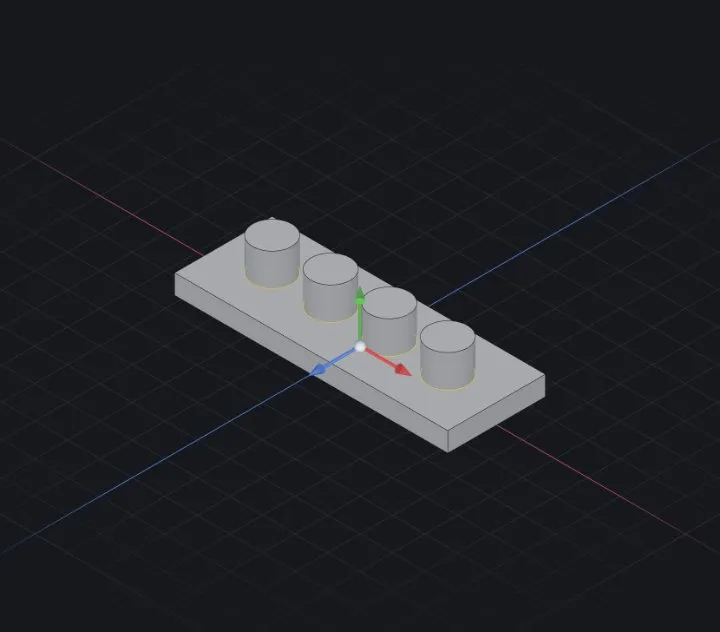
The pattern family
- Linear — count × spacing along a direction; optionally a second direction for a grid.
- Circular — count around an axis; full circle (equal spacing) or a set angle step.
- Curve-driven — instances follow a sketch curve.
- Sketch-driven — one instance at every sketch point (drill a hole pattern from a layout sketch of points).
- Fill — pack a face region with a grid of instances (speaker grilles, vents).
Steps (linear)
- Create the seed feature — a boss, a cut, a Fillet & chamfer…
- Start Pattern ▸ Linear. The most recent feature is preselected; add more under Features to pattern.
- Pick a direction — an edge, an axis, or a base axis — set count and spacing.
- ✔ OK. Preview shows every instance before you commit.
Mirror
Mirror features (or whole bodies) across a base plane, a datum plane or a planar face. Model half of a symmetric part, mirror once, and edit only the half forever after.
Direction sources
Directions and axes can come from model geometry — a straight edge, a cylindrical face's axis — not just the world X/Y/Z, so patterns stay correct when the part rotates.
When it fails
- Instances merge into each other — spacing smaller than the seed's size; increase it.
- An instance lands off the body — for cuts that's an error by design (a cut must remove material); shrink the count or reposition.
Related: Extrude (boss & cut) · Fillet & chamfer · Variants & design tables