Equations & global variables
Give a number a name, then drive dimensions and feature parameters from it — change the name's value and the whole part re-drives.
Model the intent, not the numbers. Name a value once, point every dimension that depends on it at that name, and one edit re-drives the part.
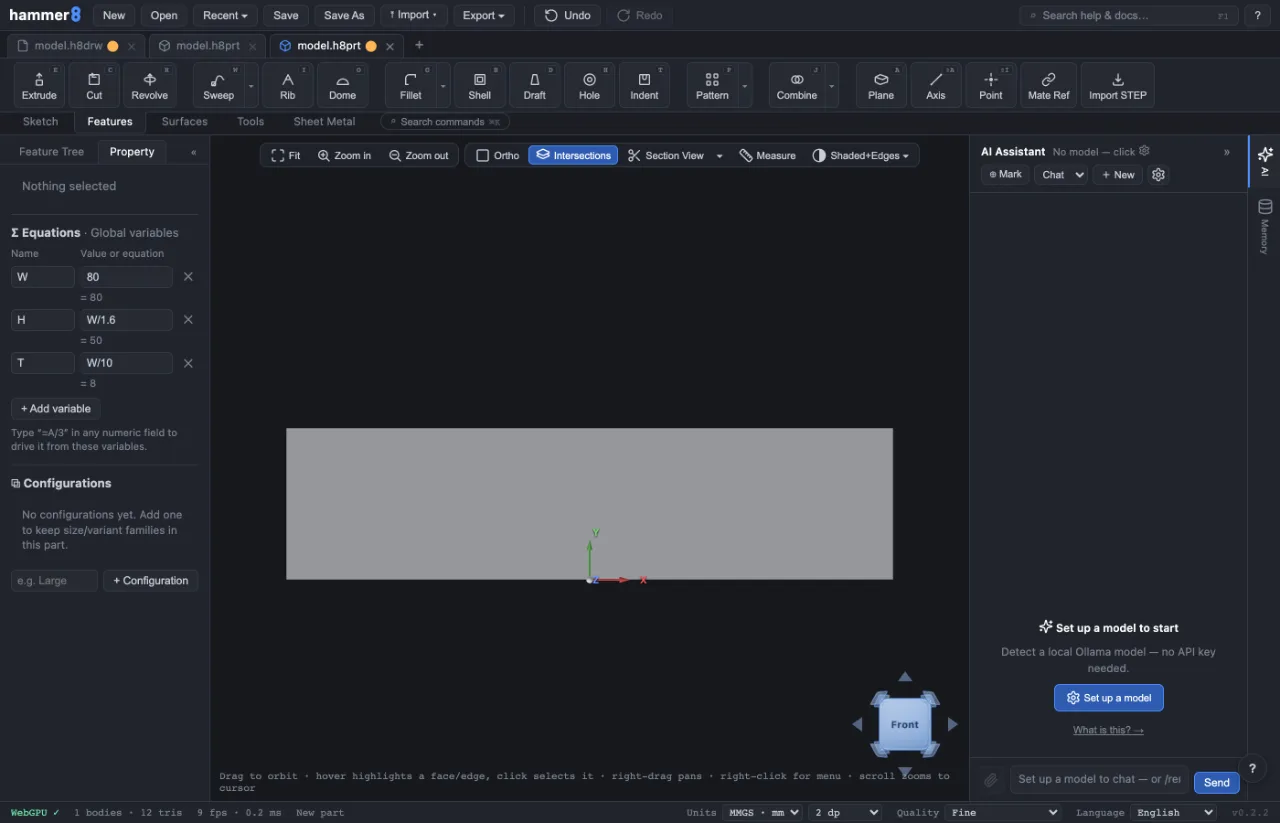
The variables table
Click empty space so nothing is selected — the right panel then shows the document-level Σ Equations · Global variables.
- + Add variable adds a row: a Name and a Value or equation.
- Names start with a letter and hold letters, digits and
_—A,Width,bolt_count. They are case-sensitive. - The value can be a plain number (
213) or an expression referring to other rows (B/3 + 10).
Rows may reference each other in any order, and each row shows its resolved value live — or its own error, without breaking the others.
Driving a dimension or a parameter
Start any dimension box or PropertyManager number field with = and the rest is an expression:
=W— this dimension is the width=W/2— always half of it=max(T, 2) + 0.5— never thinner than 2
Set W = 80, sketch a plate with =W and =W/2, extrude it =W/8, then change W to 96 — the sketch re-solves and the extrude re-drives together on the next rebuild.
What you can write
+ - * / %,^and parenthesessqrt abs floor ceil round min max pow hypotsin cos tan asin acos atan atan2— in degrees, matching every angle the interface shows- the constants
piande - any other variable, by name
It is a real parser, not eval: a file someone sends you cannot run code through an expression.
Diameter dimensions
A ⌀ dimension is stored internally as a radius, but you write the diameter you mean — =B on a ⌀ dimension gives a bore of diameter B, never 2B.
Design tables
The same variables can be driven from a CSV design table — one row per variant, one column per name — which is how a size family is built; see Variants & design tables.
When it fails
- Unknown name — the row you referenced does not exist or is spelled differently. Check the case.
- A cycle —
A = BwhileB = Acannot resolve; both rows report it and keep their last good values. - The model didn't move — a broken equation never fails the rebuild. The driven value keeps its last good number and the offending row is flagged, so fix the equation, not the dimension it drives.
Related: Dimensions & constraints · Variants & design tables · Working with the feature tree